New timetable starts on 9 November 2026. Enrolment is open!

We teach children to design and build robots, code and create 3D worlds, from age 4 and up

Original courses taught on the centre's own software. We gently turn a child's interest in gadgets and games into making things, engineering and real IT skills, from first mechanisms to the industrial Rust language and 3D printing.

Find a course by age Class timetable

Our courses and programmes

Robots, coding in Kubotor or real Rust code: choose by age and by interest. Each course page tells you who it is for and what your child will be doing.

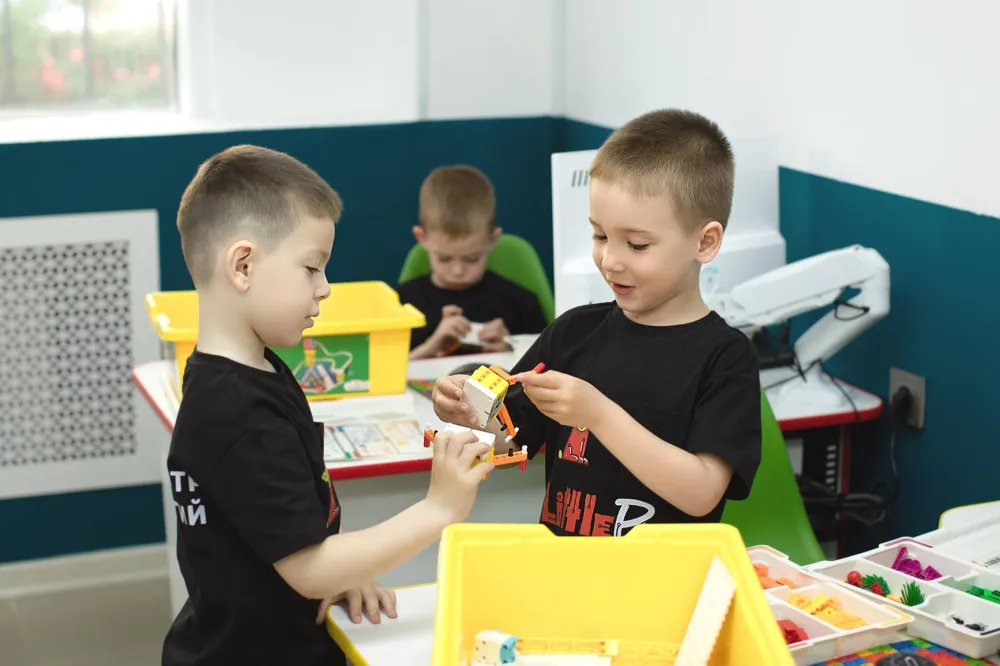
Two boys in class build a model from construction parts

4–6 years6.5–7.5 years8–9 years10+ yearsCentre favourite

Robotics

Duration: 1 h 45 min (younger) / 3 hours (older, 8+ years).

A single multi-year programme from first mechanisms on LEGO Essential to complex autonomous robotics on LEGO Prime. At the senior levels robots are programmed in the industrial language Rust through the centre's own software!

Details by level

Children build a robot with their own hands, bring it to life with a program, and see straight away how it drives, turns and finds the line. At four the program is made of pictures; from ten it is real code in Python or Rust.

What this course is:

This is a single programme thought through for many years ahead, which gently leads a child from first steps in construction to serious engineering projects. A child does not begin each school year with a blank slate: at the very first level the little ones meet the technology through the special LEGO Essential educational set, and from the second level on we use the same advanced LEGO Prime kit, gradually making the programming language and the tasks more demanding (like our Kubotor course).

Our centre's main pride: at the senior level robots are programmed in the professional Rust language. Thanks to our centre's own software we were the first to adapt this industrial language for children's robotics. You will not find this approach in ordinary clubs!

  • Lesson length:
    • 1 hour 45 minutes for the younger levels (4–6 and 6.5–7.5 years).
    • 3 hours (with a mandatory break for rest and airing the room) for the senior levels (8–9 and 10+ years). In this time children go through the full cycle without haste: from discussing the idea and building a complex mechanism to writing code and testing.
  • Timetable:
    • Level 1 (4–6 years): Tue – Fri at 17:30
    • Level 2 (6.5–7.5 years): Sat, Sun at 10:00
    • Level 3 (8–9 years): Sat 10:00, Sun 13:30
    • Level 4 (10+ years): Sat 13:30, Sun 17:00
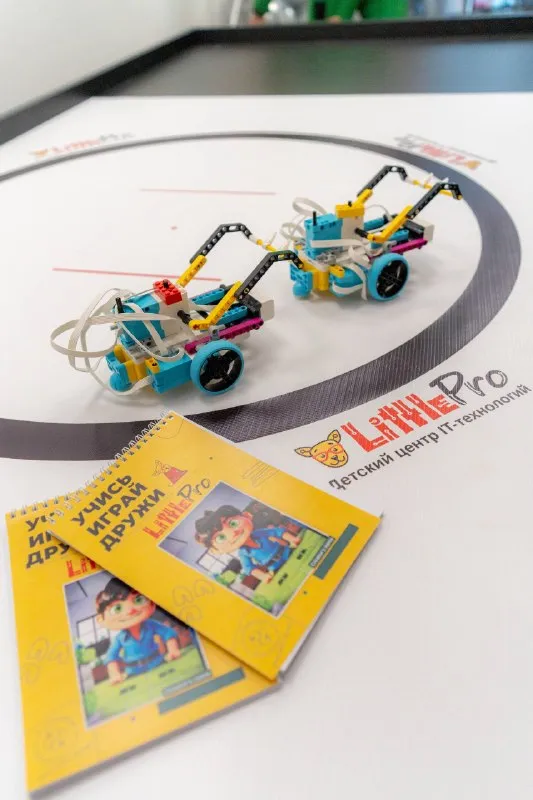
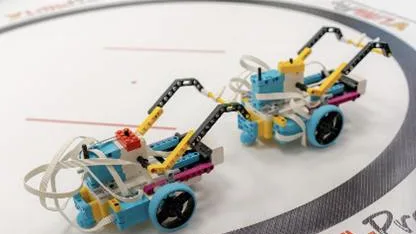
Two robots built from a construction kit on the centre's training field, next to the course workbooks

How learning works at each level:

Level 1 (4–6 years, preschoolers): First mechanisms, a fairy tale and basic sensors:

Tools: The LEGO Essential educational kit + visual block programming.

Engineering focus: Little ones meet basic mechanics: they learn to join parts and use simple axles, pulleys and levers. They build moving models of animals, cars or fairy-tale characters, connect their first motion and touch sensors, then bring them to life with visual block programming. Lessons are built around a fairy-tale plot and frequent changes of activity.

Level 2 (6.5–7.5 years, grade 1): Automation, sensors and first algorithms on LEGO Prime:

Tools: The advanced LEGO Prime kit + visual block programming.

Engineering focus: First-graders study gear ratios (how to increase speed or pull with gears), build strong frames and work with the full range of sensors (colour, ultrasonic distance, touch). For the first time they program logical branches and loops: for example, "if the robot sees an obstacle, stop and go around".

Level 3 (8–9 years, grades 2–3): Mechanical drives, calculations and text-block code:

Tools: The LEGO Prime kit + a text-block language (with a parallel projection of the code into Rust).

Engineering focus: Children build complex mechanisms (gear and worm drives, grippers, manipulators). In programming they move to a text-block language: they set variables, calculate distance from wheel turns and tyre diameter, write navigation algorithms and follow a live projection of the code into Rust in parallel.

Level 4 (10+ years, grade 4 and up): Autonomous robotics and systems code in Rust:

Tools: The LEGO Prime kit + text code in Rust.

Engineering focus: Real adult engineering. Teenagers design high-precision models and optimise the robot's weight and balance. They write full programs in Rust: set up real-time sensor feedback, create proportional control algorithms (smooth line following), control motor ports and build fully autonomous behaviour.

Why a child needs it:
  • Now: Hands are busy with fine motor work, spatial construction and mechanics. Gadgets turn into a working tool for creativity. School maths and physics gain practical meaning (angles, speed, distance), and mistakes are seen as an interesting engineering puzzle.
  • In the future: For little ones, an excellent base for school (perseverance, concentration, speech). For older ones, strong engineering thinking, a base for olympiads and a foundation for professions in robotics, automation and programming.
EnrolOpen the course page →

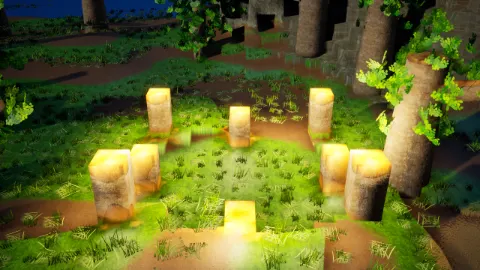
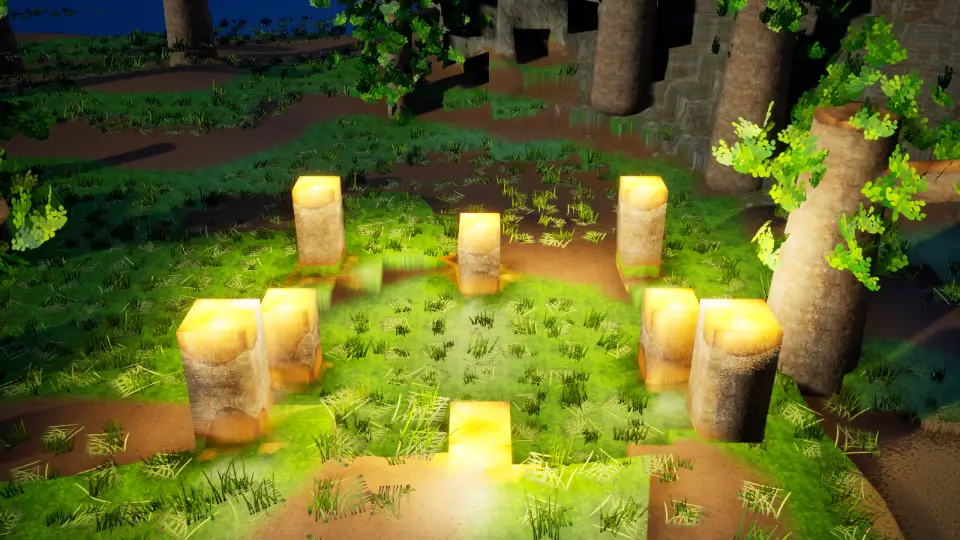
Night in the Kubotor game: eight stone lamp posts glow in a clearing among trees

4–6 years6.5–7.5 years8–9 years10+ yearsThe centre's own platform

★ Kubotor educational game

Duration: 1 h 45 min.

Our own educational game and platform for creating virtual worlds! The better a child codes, the more beautiful and realistic their server becomes. Free to download for home use (Windows, Linux, Android), includes safe monetisation of creative work under parental control.

How Kubotor works

Programming in Kubotor, our game with a living world. Here a program changes the world at once: it builds faster than your hands can, lights the lamps before nightfall and puts up a shelter in the rain. Little ones program with pictures, older kids with blocks, and from ten with real code in Rust.

What this course is:

Kubotor is our own educational game and a full platform for creating virtual universes. The game itself is freely available: it can be downloaded for free on our website for Windows, Linux and Android (soon macOS and iOS), so a child can create and practise at home.

In lessons at the centre we follow a special educational programme that is not publicly available. Children become full developers: they create their own games and worlds on their own server. The main secret of Kubotor: the better a child programs, the more colourful, complex and realistic the world on their server becomes.

  • Lesson length: 1 h 45 min.
  • Timetable: 4–6 years (Wed, Fri at 17:30) | 6.5–7.5 years (Sat at 14:00) | 8–9 years (to be confirmed on enrolment) | 10+ years (Sun at 16:00).
Night in the Kubotor game: eight stone lamp posts glow in a clearing among trees
What children do at each age:
  • 4–6 years (Meeting the PC and visual block programming): A gentle introduction to a real computer, mouse and keyboard. We develop fine motor skills, coordination and logic. In the game little ones build towns, roads and heroes from cubes, "bringing them to life" with clear visual picture blocks (like a puzzle), learning colours, shapes and counting along the way.
  • 6.5–7.5 years (Complex worlds and visual block programming): Building well-planned locations and branching scenarios: tasks on symmetry, spatial orientation, chains of events and team quests in pairs.
  • 8–9 years (Text-block programming with a live projection of the code into Rust): A transitional stage. Children assemble programs from blocks with text commands (variables, calculations, loops, conditions) without the stress of typos. At the same time the child sees on screen, in real time, how real text code in Rust takes shape from their blocks, getting used to its syntax by eye.
  • 10+ years (Professional code in Rust): A smooth move to writing code in Rust independently. With code the student directly controls the physics, graphics, logic and beauty of the server, developing complex algorithms and unique game mechanics.
Creating at home and safe monetisation under parental control:

In lessons at the centre we focus exclusively on teaching and an algorithmic base. At home a child can develop their server: the popularity of their world among other players and its potential income depend on the knowledge and work put in. All monetisation matters are strictly under parental control: a safe and honest trainer for adult life.

Why a child needs it:
  • Now: Natural motivation to learn ("I'll learn this topic in class to make my server even cooler at home"). Confident use of a PC, practice in logic and maths.
  • In the future: Help at school (presentations, projects, geometry, computer science) and a fundamental base in Rust for future professions in IT, engineering, architecture and game design.

EnrolOpen the course page →

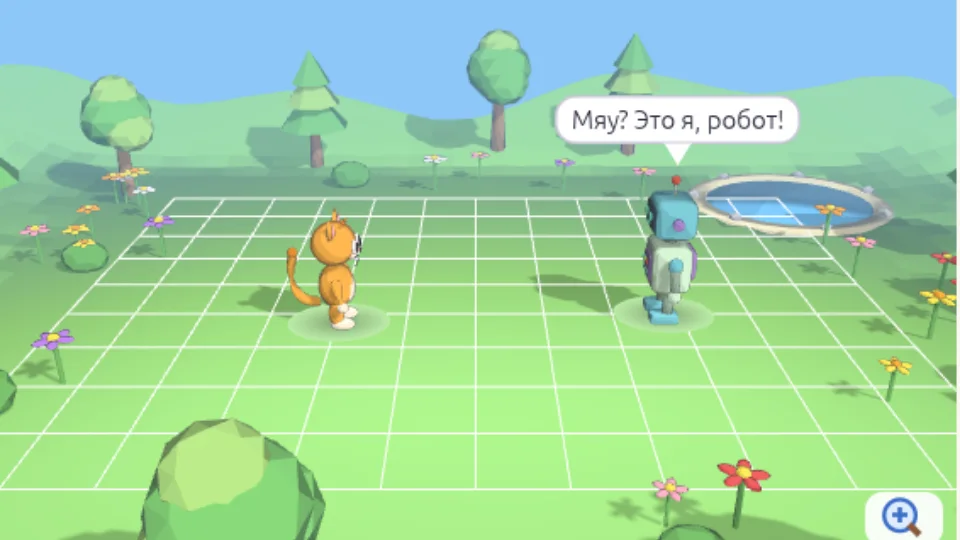
Axon3D 42: a 3D meadow with Kitty and Robot, Robot says a line

4–6 years6.5–7.5 years8–9 years10+ yearsAkson software + 3D printing

Computer graphics and 3D modelling in Akson software

Duration: 1 h 45 min.

A multi-level course in digital creativity, 2D illustration and 3D modelling on the centre's own Akson software (an educational analogue of Blender and KOMPAS). The programme is fully adapted to preparing models for real 3D printing!

About the course
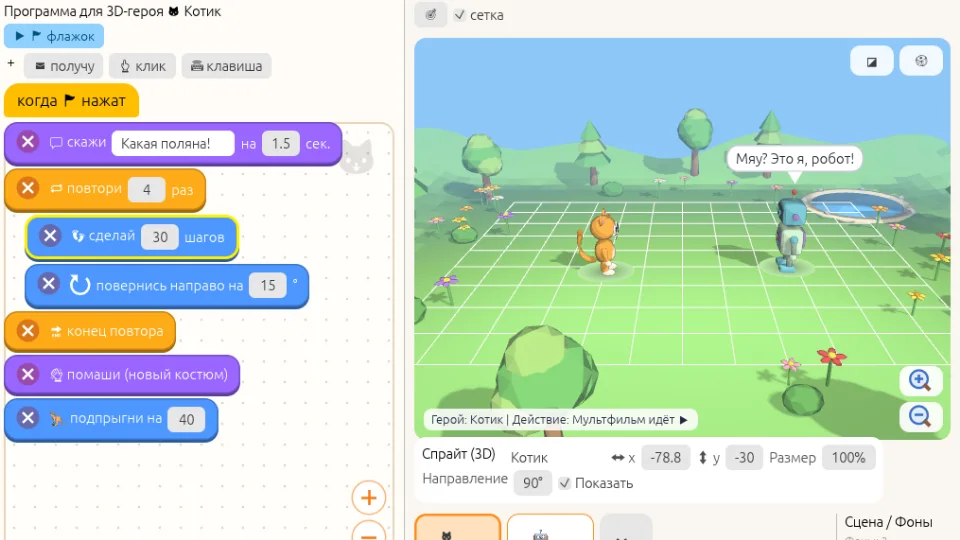
Axon3D 42, Kids level: a block program on the left, a 3D meadow with heroes on the right
Kids level: blocks on the left, a 3D cartoon on the right.
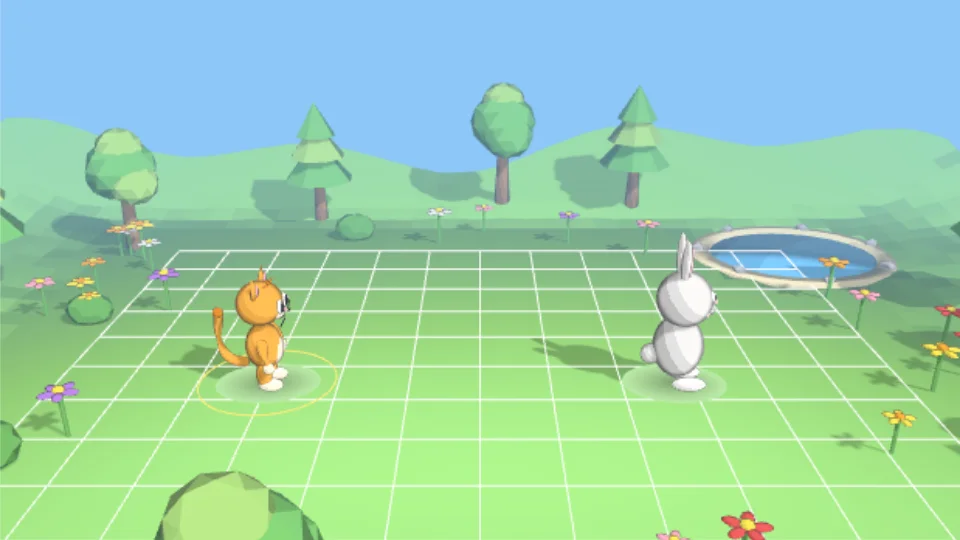
Axon3D 42, Little ones level: Kitty and Bunny in a 3D meadow
Little ones level: the heroes in a 3D meadow follow picture buttons.
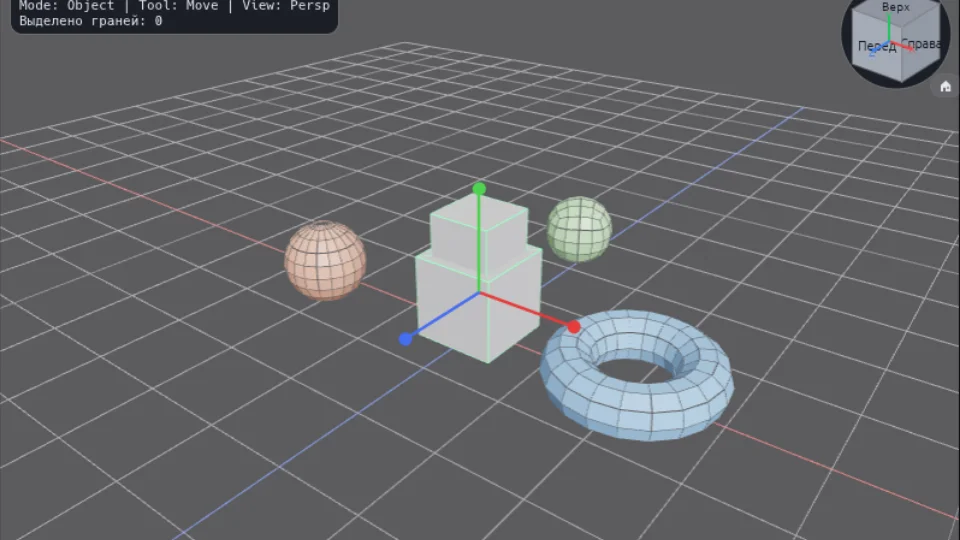
Axon3D 42, Intermediate level: a cube, a sphere and a torus on the scene grid
Intermediate level: modelling shapes, axes and layers.
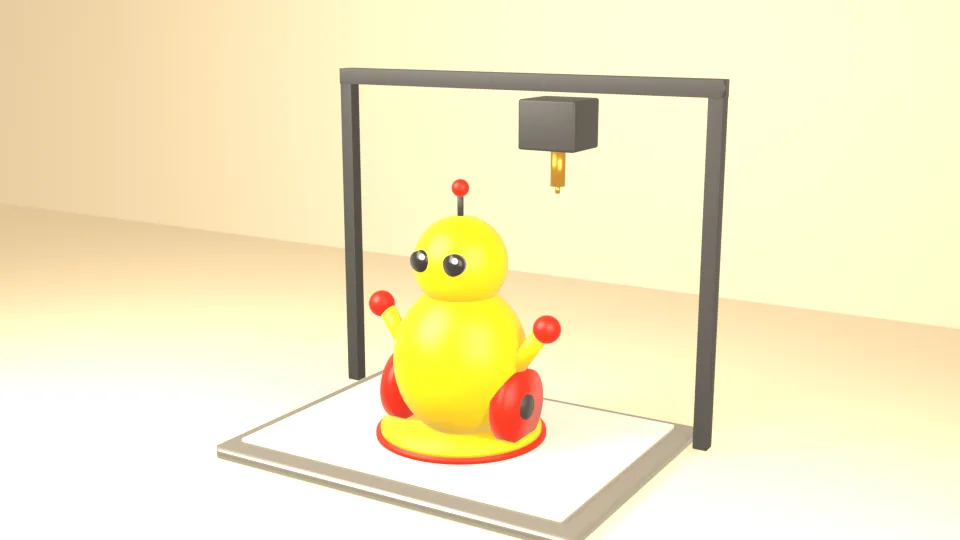
Illustration: a mascot robot model being printed on a 3D printer
A model from Axon goes to the centre's 3D printer (illustration).
What this course is:

A fascinating and deep course in digital creativity for children from age 4. The programme has a multi-level structure (like the Kubotor course), carefully adapted to each age.

Lessons take place on our own specialised Akson software, created especially for education. It is a powerful and intuitive analogue of the professional Blender and KOMPAS systems, where children learn both 2D drawing and full 3D modelling without overloaded "adult" interfaces. The software is also fully adapted to 3D printing: children learn to prepare virtual three-dimensional objects for creation in the real world on a 3D printer.

  • Lesson length: 1 hour 45 minutes.
  • Timetable:
    • 4–6 years: Tue, Thu at 17:30
    • 6.5–7.5 years: Sat at 12:00
    • 8–9 and 10+ years: Sun at 14:00 (plus additional slots Sat 13:30 / Sun 16:00).
How learning works by level:
  • For the youngest (4–6 years): Meeting basic colours, shapes and the digital canvas in Akson. Developing fine motor skills and spatial imagination through creative tasks.
  • For younger schoolchildren (6.5–9 years): The basics of vector and raster graphics, creating characters, comics and pixel art, and first steps in three-dimensional space: making simple 3D models and solid objects.
  • For teenagers (10+ years): Advanced Akson tools for 2D and 3D modelling. Principles of composition, light and shade, texturing and engineering design of objects at the level of CAD and 3D design systems (Blender/KOMPAS).
  • Practice and 3D printing: Each student builds a portfolio, from illustrations and sticker packs to complex 3D models that can be prepared and printed on the 3D printer at our centre.
Why a child needs it:
  • Now: The computer becomes a tool for making things. Spatial thinking, engineering logic and aesthetic taste develop, and the child sees a physical result of their work in printed 3D models.
  • In the future: A strong base for professions of the future: from 3D modeller, game designer and animator to industrial engineer, architect and UI/UX designer.

Enrol

Two robots built from a construction kit on the centre's training field, next to the course workbooks

Special group (by selection)Tournaments and 3D printing

Competitive robotics (special group)

Duration: 3 hours (Sunday at 10:00).

An advanced competitive group. It works like a real design bureau: from scratch children choose electronics, design the housings themselves and print them on a 3D printer, preparing for real tournaments and olympiads.

Selection terms and programme
What this course is:

An advanced competitive group for those who have already mastered basic robotics and want to test themselves at real tournaments and olympiads (admission is by the teacher's selection). Here robots become sports fighters: they run complex trajectories against the clock, carry out precise tasks on the field and compete with other teams. Lessons take place on our centre's own software, adapted to the high demands of competition rules.

  • Lesson length: 3 hours (intensive training on the field, designing housings and mechanisms, refining mechanics, debugging code and detailed analysis of runs).
  • Timetable: Sunday at 10:00.
How learning works and what children do:
  • Building a robot from scratch on their own: Children do not assemble robots from ready-made instructions. They choose and connect the electronics themselves, design unique housings for the specifics of a competition and print them on a 3D printer. This is a full engineering cycle.
  • An engineering bureau format with flexible roles: Children work in teams. Roles are shared according to the number of participants, and children can swap roles or combine several functions:
    • The designer is responsible for strength, balance and mechanics.
    • The programmer writes precise algorithmic code for following the line and using sensors.
    • The operator leads the start on the field and watches that the rules are followed.
  • Competition tasks: Calibrating sensors for different lighting, complex trajectories, tight timing and stable mechanisms.
Why a child needs it:
  • Now: A strong school of character, self-control and resilience under the pressure of the timer. Working in a team and learning from mistakes helps with school tests and exams.
  • In the future: Wins and diplomas form a weighty portfolio for entering specialised engineering classes, lyceums and technical universities, laying a solid foundation for a successful career in programming, engineering and high technology.

ApplyOpen the course page →

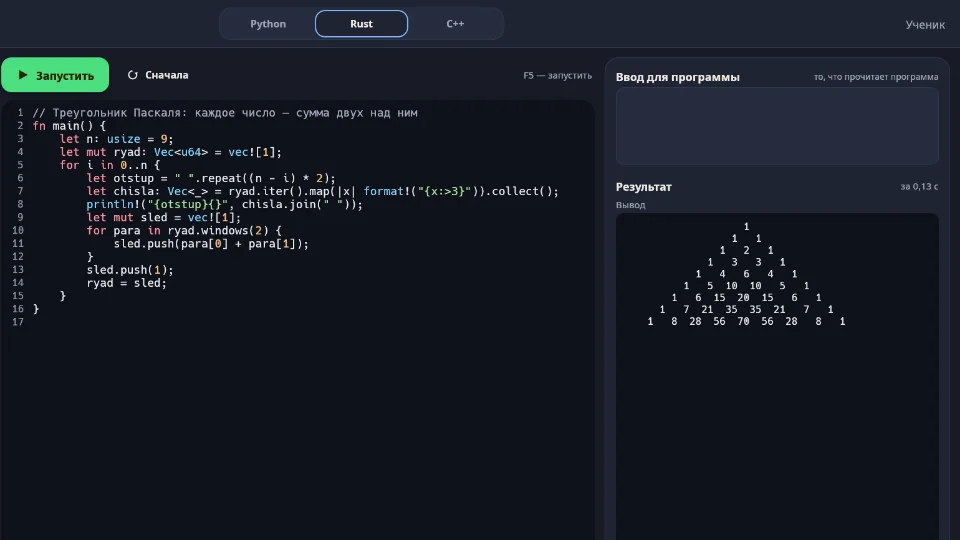
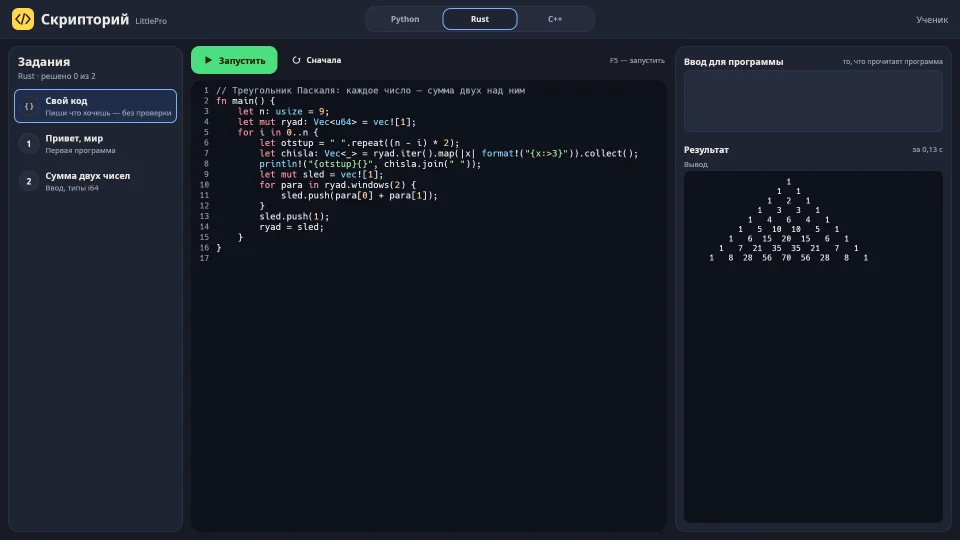
Skriptoriy, the centre's own program: Rust code for Pascal's triangle and its output

10+ yearsExclusive to the centreSystems language

Rust programming

Duration: 1 h 45 min (Sunday at 12:00).

We were the first to adapt the powerful industrial language Rust for schoolchildren, on the centre's own software! For those who want to look "under the hood" of a computer, create fast games and utilities and develop iron logical discipline.

More about the Rust course
Skriptoriy in the dark theme: a Rust program prints Pascal's triangle
Skriptoriy: your own Rust programs — write, run, see the result.
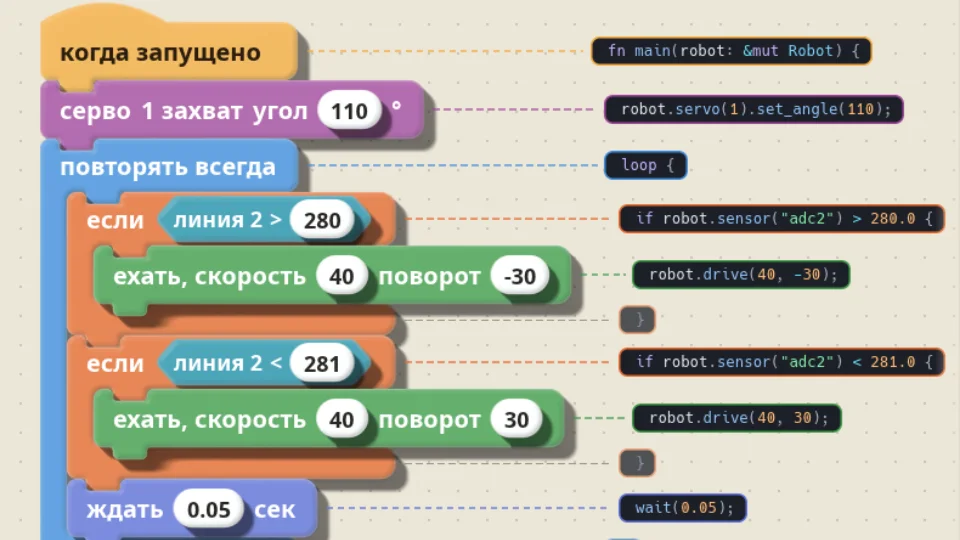
LittlePro Studio: a line-following program in blocks, with the same lines in Rust beside them
LittlePro Studio: robots are programmed in the same Rust — each block shows its line of code.

Rust is a real written language used to build serious software. Children write Rust code from the age of ten, and from four they prepare for it: algorithms, working with a computer, controlling a robot, programs made of blocks. So they come to Rust ready for it, and learning it is easier.

What this course is:

A course in a modern systems programming language for children from age 10 who want to look "under the hood" of a computer and understand how technology works from the inside. In almost all clubs children are taught only basic scripting languages, but our course is unique: we were the first to adapt the powerful industrial language Rust for schoolchildren. Lessons take place on our centre's own software, which makes a complex systems language clear and visual.

  • Lesson length: 1 hour 45 minutes.
  • Timetable: Sunday at 12:00.
  • Who it is for: Children from age 10 who are ready for exact rules and systems thinking.
How learning works and what children do:
  • Meeting a "living" industrial language: No dry theory from adult textbooks. Complex concepts (data types, structs, enums, and also memory, ownership and borrowing) are explained through clear games and everyday examples (for instance, how to lend something to a friend for a while under clear rules).
  • Practical projects and utilities: Children write console games, text quests and useful utilities, learn to read compiler hints and write tests to check their code, like real developers in IT companies.
  • The role of the strict compiler: The Rust compiler works like a caring mentor: it does not scold for mistakes but explains in detail where the slip is, building attentiveness and logical discipline.
Why a child needs it:
  • Now: The child understands the inner workings of a computer: why some apps respond instantly while others "lag". After mastering such a strict language, any other programming language will seem incredibly simple!
  • In the future: Rust is used to build operating systems, browsers, high-performance games and cloud servers. It is a very rare skill that opens the doors to the IT elite: systems programming, cybersecurity, game development, blockchain and robotics.

EnrolOpen the course page →

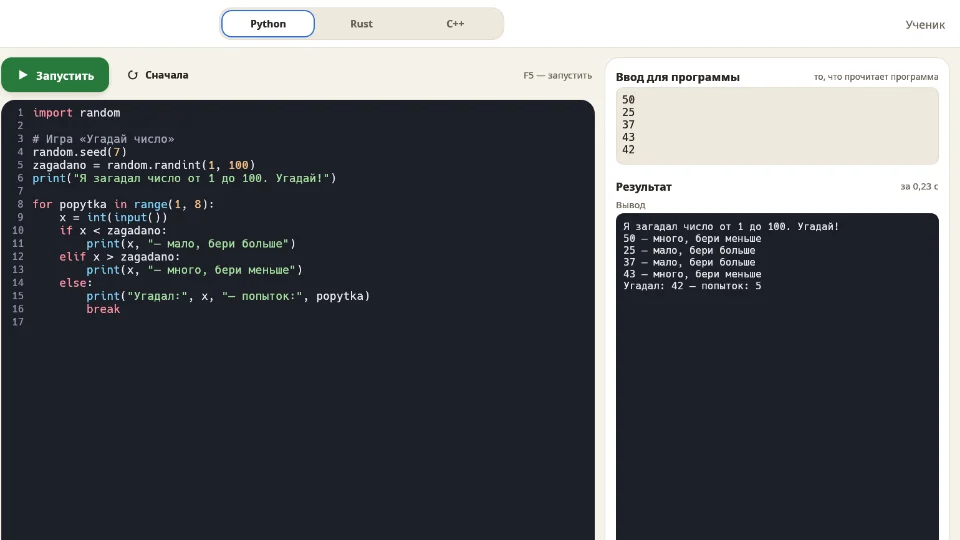
Skriptoriy, the centre's own program: a Guess the Number game in Python — code, input and output

10+ yearsGames, bots and a base for OGE/EGE

Python programming

Duration: 1 h 45 min (Saturday at 16:00, Sunday at 18:00).

A popular, balanced language with clear syntax for a confident step into text code. Children build 2D games with graphics and smart chatbots, and get a strong base for school computer science (OGE and EGE).

More about the Python course
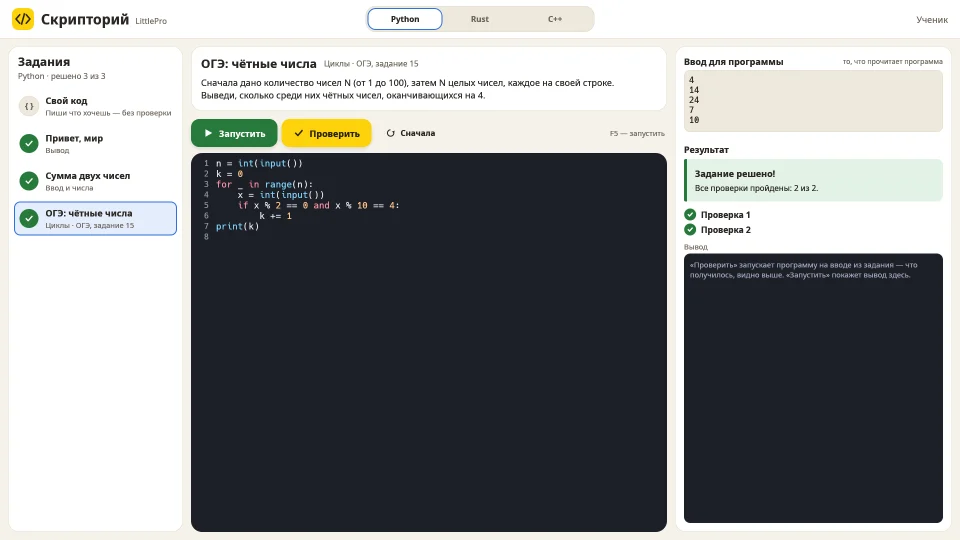
Skriptoriy: the exam task on even numbers is solved, both checks passed
Skriptoriy, the centre's own program: tasks with automatic checks, including exam-style ones; Python, Rust and C++.
What this course is:

A popular and balanced programming language, a great confident step into text code for children from age 10. Python's syntax is intuitive and close to ordinary English, which lets children master the syntax base quickly without technical overload. The course programme is original and adapted to our centre's own software.

  • Lesson length: 1 hour 45 minutes.
  • Timetable: Saturday at 16:00 and Sunday at 18:00 (easy to combine with school and the second shift).
How learning works and what children do:
  • Learning the basics through practice: Variables, conditions, loops, functions, lists and dictionaries are mastered right in the process of creating projects.
  • Practical mini-games and bots: Students write 2D games with graphics, create chatbots for messengers and develop helper programs.
  • Working with code and logic: Children learn to analyse error messages, look for slips in code and solve applied algorithmic tasks.
Why a child needs it:
  • Now: Understanding Python's logic helps children find their way confidently in the digital world, see how familiar programs are made and use modern technology consciously.
  • In the future: Python is widely used in web development, data analysis and automation. Knowing this language is a great help in the OGE and EGE computer science exams and a handy step towards further growth in IT.

EnrolOpen the course page →

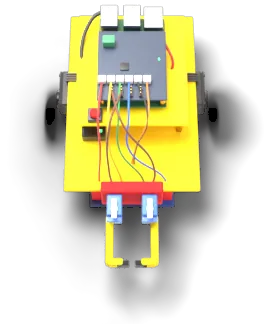
From fourteen, and for competitions, students work with robots designed by the centre itself: industrial servo drives, a Raspberry Pi board, a 3D-printed body and our own development environment. Students make the grippers themselves.

🤔 A dilemma for teenagers and parents: which text language to start with, Python or Rust?

Both courses are for children from age 10 and run on the centre's own software, but the goals and character of the languages differ.

Compare the languages in detail
Selection criterion🐍 Choose Python if your child wants:⚙️ Choose Rust if your child wants:
Starting styleA fast and smooth start: the syntax is close to English, working programs appear right away.To look "under the hood" of a PC: to understand how memory, the processor and programs work at a deep systems level.
What we make in classInteractive 2D games with graphics, chatbots for messengers and applied programs.Fast console games, text quests, system utilities and industrial-grade code.
Superpower and focusHelp at school (OGE/EGE in computer science), future web development, data analysis and AI.Iron discipline of the mind with a strict compiler. After Rust any other language comes easily! Prospects in systems development, game development and robotics.
TimetableSat at 16:00 or Sun at 18:00Sun at 12:00

Choose your child's age and a convenient time

We take into account school shifts, workload and the psychology of each age.

Age notes: In kindergarten during the day. Classes run on weekday evenings (17:30) and at weekends. Play format, developing fine motor skills and meeting the PC without overload.

Available courses:

Timetable for this age:

  • Tuesday:17:30–19:15Rm 1Robotics (4–6 years) · LEGO Essential
  • Tuesday:17:30–19:15Rm 2Computer graphics Akson (4–6 years)
  • Wednesday:17:30–19:15Rm 1★ Kubotor (4–6 years)
  • Wednesday:17:30–19:15Rm 2Robotics (4–6 years) · LEGO Essential
  • Thursday:17:30–19:15Rm 1Robotics (4–6 years) · LEGO Essential
  • Thursday:17:30–19:15Rm 2Computer graphics Akson (4–6 years)
  • Friday:17:30–19:15Rm 1★ Kubotor (4–6 years)
  • Friday:17:30–19:15Rm 2Robotics (4–6 years) · LEGO Essential

Age notes: They study in the first shift and are free after lunch and at weekends. Moving to conscious logic and first algorithms.

Available courses:

Timetable for this age:

  • Saturday (10:00–18:00):10:00–11:45Rm 2Robotics (6.5–7.5 years) · LEGO Prime + Blocks
  • Saturday (10:00–18:00):12:00–13:45Rm 2Computer graphics Akson (6.5–7.5 years)
  • Saturday (10:00–18:00):14:00–15:45Rm 2★ Kubotor (6.5–7.5 years)
  • Sunday (10:00–20:00):10:00–11:45Rm 2Robotics (6.5–7.5 years) · LEGO Prime + Blocks

Age notes: Many study in the second shift, so all groups are at weekends. Moving to text-block code with a live projection into Rust.

Available courses:

Timetable for this age:

  • Saturday (10:00–18:00):10:00–13:00Rm 1Robotics (8–9 years) · LEGO Prime + Text-block code (3 hours)
  • Sunday (10:00–20:00):13:30–16:30Rm 1Robotics (8–9 years) · LEGO Prime + Text-block code (3 hours)

Age notes: A convenient weekend timetable that respects school shifts and Saturdays. Adult tools, text code, real engineering and preparation for the OGE/EGE exams.

Available courses:

Timetable for this age:

  • Saturday (10:00–18:00):13:30–16:30Rm 1Robotics (10+ years) · LEGO Prime + Rust (3 hours)
  • Saturday (10:00–18:00):16:00–17:45Rm 2Python programming (10+ years)
  • Sunday (10:00–20:00):10:00–13:00Rm 1Competitive robotics (special group by selection, 3 hours)
  • Sunday (10:00–20:00):12:00–13:45Rm 2Rust programming (10+ years)
  • Sunday (10:00–20:00):14:00–15:45Rm 2Computer graphics Akson (10+ years)
  • Sunday (10:00–20:00):16:00–17:45Rm 2★ Kubotor (10+ years)
  • Sunday (10:00–20:00):17:00–20:00Rm 1Robotics (10+ years) · LEGO Prime + Rust (3 hours)
  • Sunday (10:00–20:00):18:00–19:45Rm 2Python programming (10+ years)

Available courses:

Timetable for this age:

  • Sunday (10:00–20:00):10:00–13:00Rm 1Competitive robotics (special group by selection, 3 hours)

Unified class timetable (from 9 November 2026)

Day:
Age:

No classes for this age on this day. Choose another day.

Weekdays (Tuesday to Friday), 17:30–19:15 (1 h 45 min):

Room 1Room 2
Tuesday:Robotics (4–6 years) · LEGO EssentialComputer graphics Akson (4–6 years)
Wednesday:★ Kubotor (4–6 years)Robotics (4–6 years) · LEGO Essential
Thursday:Robotics (4–6 years) · LEGO EssentialComputer graphics Akson (4–6 years)
Friday:★ Kubotor (4–6 years)Robotics (4–6 years) · LEGO Essential

Saturday (10:00–18:00):

10:00–11:45Rm 2Robotics (6.5–7.5 years) · LEGO Prime + Blocks
10:00–13:00Rm 1Robotics (8–9 years) · LEGO Prime + Text-block code (3 hours)
12:00–13:45Rm 2Computer graphics Akson (6.5–7.5 years)
13:30–16:30Rm 1Robotics (10+ years) · LEGO Prime + Rust (3 hours)
14:00–15:45Rm 2★ Kubotor (6.5–7.5 years)
16:00–17:45Rm 2Python programming (10+ years)

Sunday (10:00–20:00):

10:00–11:45Rm 2Robotics (6.5–7.5 years) · LEGO Prime + Blocks
10:00–13:00Rm 1Competitive robotics (special group by selection, 3 hours)
12:00–13:45Rm 2Rust programming (10+ years)
13:30–16:30Rm 1Robotics (8–9 years) · LEGO Prime + Text-block code (3 hours)
14:00–15:45Rm 2Computer graphics Akson (10+ years)
16:00–17:45Rm 2★ Kubotor (10+ years)
17:00–20:00Rm 1Robotics (10+ years) · LEGO Prime + Rust (3 hours)
18:00–19:45Rm 2Python programming (10+ years)

Robotics

  • Level 1 (4–6 years): Tue – Fri at 17:30
  • Level 2 (6.5–7.5 years): Sat, Sun at 10:00
  • Level 3 (8–9 years): Sat 10:00, Sun 13:30
  • Level 4 (10+ years): Sat 13:30, Sun 17:00

★ Kubotor educational game

Timetable: 4–6 years (Wed, Fri at 17:30) | 6.5–7.5 years (Sat at 14:00) | 8–9 years (to be confirmed on enrolment) | 10+ years (Sun at 16:00).

Computer graphics and 3D modelling in Akson software

  • 4–6 years: Tue, Thu at 17:30
  • 6.5–7.5 years: Sat at 12:00
  • 8–9 and 10+ years: Sun at 14:00 (plus additional slots Sat 13:30 / Sun 16:00).

Competitive robotics (special group)

Timetable: Sunday at 10:00.

Rust programming

Timetable: Sunday at 12:00.

Python programming

Timetable: Saturday at 16:00 and Sunday at 18:00 (easy to combine with school and the second shift).

Calendar of holidays and breaks 2026/27

Calendar of holidays and days off 2026/27 (Krasnodar Territory)

  • 31 Dec – 10 Jan: New Year holidays and winter break.
  • 15–21 Feb: Extra break for first-graders (6.5–7.5 years).
  • 20 Feb (Sat): Working Saturday in schools.
  • 21–23 Feb / 6–8 Mar: Public holidays.
  • 27 Mar – 4 Apr: Spring break.
  • 1 May, 9–10 May: May holidays.
  • from 27 May: Summer holidays.

Price and sign-up

Class prices

Per month13% can be refunded (tax deduction)

6 000 ₽

Robotics at any age (including the competitive special group) and all courses for ages 4–6 and 6.5–7.5.

4 000 ₽

1 h 45 min courses for children aged 8 and up: Kubotor, Akson, Python and Rust.

4 lessons, one a week.

Second subscription 25% off →

Already included in the price:

  • all construction kits
  • 3D printing and consumables
  • access to the centre's own software
  • work in small groups

Book a trial lesson

How to sign up

Give us a call: we will tell you about the lessons and find a group that suits your child's age. The centre is at 3 Murata Akhedzhaka St, bldg 1, Novorossiysk.

Call +7 938 522-44-34

Already with us? Sign in

If a child misses a lesson, it is not lost
With a medical note
The lesson is not lost.
Once every two months, no reason needed
Not lost either, as long as you let us know in advance.
If we cancel a lesson
Lessons we cancel for holidays or reschedule on our side are never lost.

Special offer

−25% on the second subscription

Two young engineers in the family, or a child who is keen on several subjects at once? Then classes at LittlePro cost less: the second subscription is 25% cheaper.

  • Families with two or more children. Brothers and sisters can attend any of the centre's courses, and the 25% discount goes to the subscription with the lower (or equal) price.
  • Children who learn across subjects. If a child combines two courses — for example, robotics and Python programming — the subscription for the second course is 25% cheaper. Robots, code and 3D modelling complement each other well.
  • The two can be combined. If one child attends two courses and a second child also studies at the centre, the 25% discount applies to every subscription in the family except the most expensive one.

The discount is taken from the full subscription price and cannot be combined with other offers. If you qualify for several discounts, we apply the one that is best for you.

Examples

Two children, same price

A brother and a sister both take robotics at 6,000 ₽ a month each.

First subscription 6,000 ₽, second 6,000 ₽ − 25% = 4,500 ₽.

Total 10,500 ₽ instead of 12,000 ₽ — you save 1,500 ₽ a month.

One child, two courses

A 10-year-old takes robotics (6,000 ₽) and Python programming (4,000 ₽).

The discount goes to the cheaper subscription, Python: 4,000 ₽ − 25% = 3,000 ₽. Robotics stays at the full 6,000 ₽.

Total 9,000 ₽ instead of 10,000 ₽ — you save 1,000 ₽ a month.

Two children, different prices

The younger child (5) takes Kubotor for 6,000 ₽, the older one (12) takes Rust programming for 4,000 ₽.

The discount goes to the lower-priced subscription, Rust: 4,000 ₽ − 25% = 3,000 ₽. Kubotor stays at the full 6,000 ₽.

Total 9,000 ₽ instead of 10,000 ₽ — you save 1,000 ₽ a month.

Two courses and a second child

The older child (10) takes robotics for 6,000 ₽ and Python for 4,000 ₽, the younger (5) takes Kubotor for 6,000 ₽.

The most expensive subscription (6,000 ₽) is paid in full, the others get 25% off: 6,000 ₽ → 4,500 ₽ and 4,000 ₽ → 3,000 ₽.

Total 13,500 ₽ instead of 16,000 ₽ — you save 2,500 ₽ a month.

Terms and conditions
  1. The “−25% on the second subscription” offer is run by the LittlePro children's centre (the Centre). A participant is a parent (legal guardian) who has an education contract with the Centre for their child (children).
  2. A 25% discount on the base price of subscriptions is given when two or more subscriptions are paid for together in one order (receipt) for the same study period.
  3. The discount applies in the following cases: a) family discount — subscriptions are bought for two or more children of one family; b) multi-course discount — subscriptions are bought for one child for two or more different courses; c) both at once — for example, one child attends two courses and a second child also studies at the Centre. In that case all subscriptions of the family's children in the order are counted together.
  4. The subscription with the highest base price in the order is paid in full. The 25% discount applies to each of the other subscriptions — those with a lower or equal base price. If the prices are equal, one of them is paid in full — the total is the same either way.
  5. If an order has three or more subscriptions, the 25% discount applies to each of them except the most expensive one. For example, with three subscriptions the most expensive is paid in full and the other two get 25% off.
  6. The base price is the full subscription price in the price list published on littlepro.ru on the payment date, before any discounts.
  7. The discount cannot be combined with other offers, promo codes, individual or permanent discounts of the Centre (for example, an early-payment discount or a large-family discount, where such discounts exist).
  8. If a participant qualifies for several discounts, one is applied — the one most favourable to the participant.
  9. The discount cannot be exchanged for cash or transferred to other study periods or other persons.
  10. Any recalculation or refund for unused lessons is based on the amount actually paid for the subscription (after the discount).
  11. For the family discount the Centre may ask for confirmation that the children are from one family (for example, a birth certificate or a guardianship document).
  12. The offer is valid until cancelled. The Centre may change or end the offer by publishing a notice on littlepro.ru. Changes do not affect subscriptions paid for before the notice is published.

About the centre and method

Who teaches and how we teach — thoughtfully, without haste

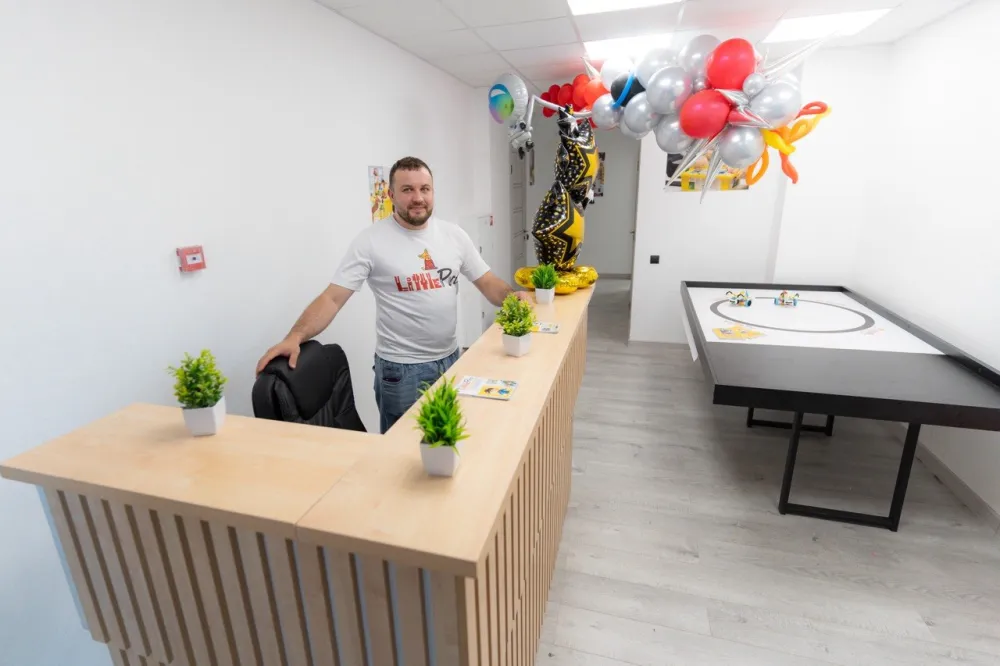
Lessons are taught by the centre's teachers. The school was founded by Stepan Gertsen.

Stepan Gertsen, founder of the centre
Experience
Stepan Gertsen has been teaching since 2018.
Our own school
Opened in January 2023.
Judging experience
Taking part in judging the WRO regional stage and the IT-KHOD engineering hackathon.
Our own software and games
We teach in our own environments (Kubotor, Akson, adapted Rust).

Not "by the booklet"

A new mechanism starts with the question "how does this work?", not with a ready answer.

Independence first

First the child tries alone, the hint comes later.

Mistakes are a puzzle

Mistakes are seen as an interesting engineering puzzle.

3 hours with a break for older groups

3 hours (with a mandatory break for rest and airing the room) for the senior levels (8–9 and 10+ years). In this time children go through the full cycle without haste: from discussing the idea and building a complex mechanism to writing code and testing.

What our lessons look like

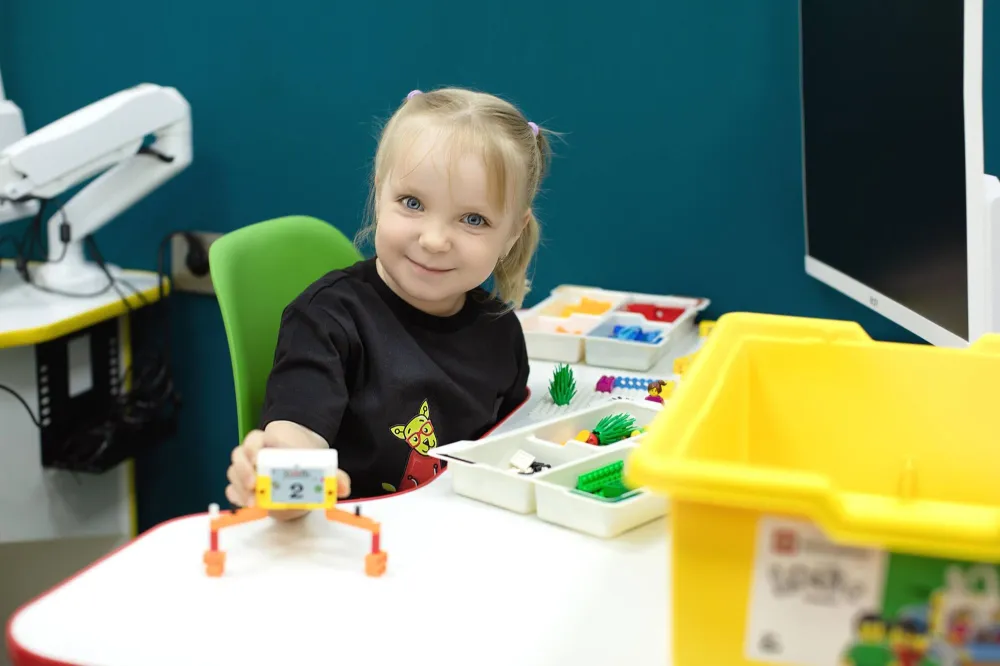
A girl at a desk in class shows the model she built
Younger group: a first model built by hand.
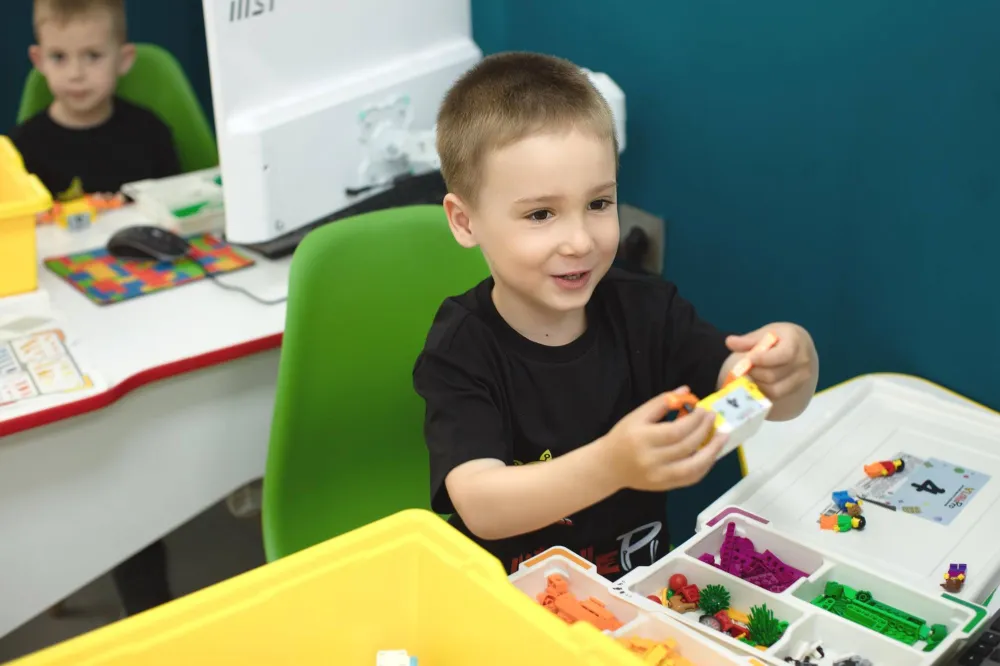
Two boys in class build a model from construction parts
Building together and talking about how to bring the model to life.
A boy at a computer desk builds a model
Parts, ideas and a computer at hand — all on one desk.

Arena

Competition training in the student's account

In the Arena, our training ground, a child will prepare for robot competitions right from home: build a robot, write a program for it and send it onto the field. We are building it right now; here is what it will offer.

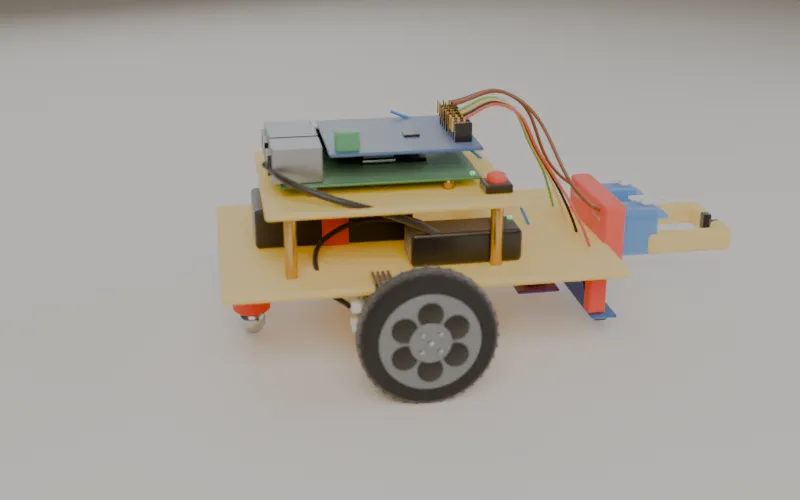
The centre's robot in 3D: wheels, board and sensor wires

Build a robot

From parts, right on the screen, in 3D. How the robot is built decides how it will drive.

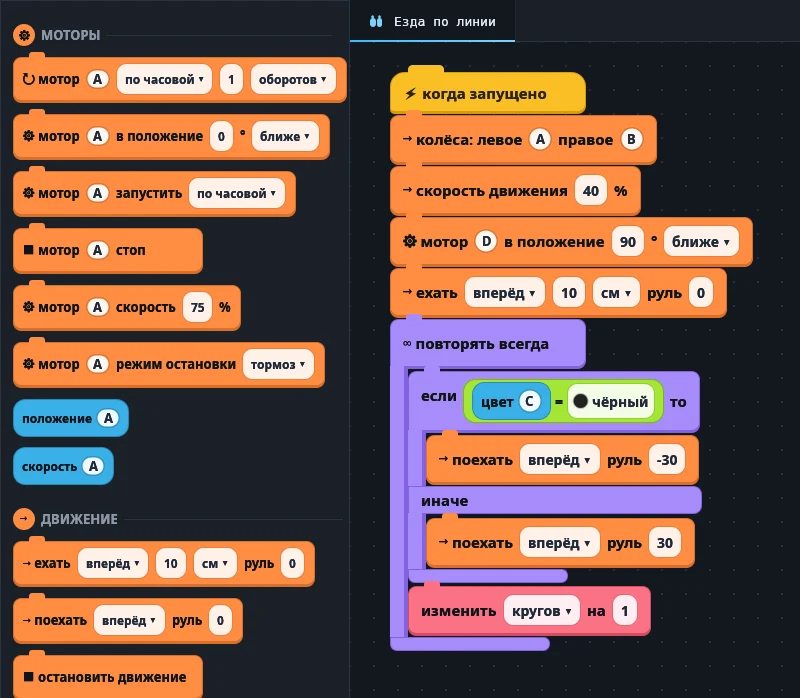
The centre's own environment: blocks on the left, the same code in Rust on the right

Write a program

In pictures, in blocks or in real Rust code, to match the child's age and skills.

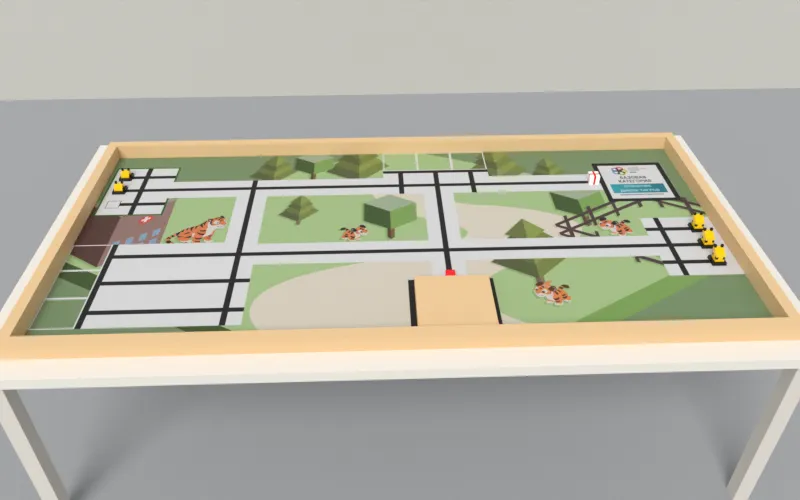
A training field in 3D on the Polygon table

Race on the field

Runs under WRO rules, robot sumo and challenges of our own. The platform will score each run by the numbers, not by eye.

Visit the Arena

Runs, results tables, the 3D robot and training with a teacher will arrive one by one. Students will enter the Arena from their own account.

Documents

Officially licensed teaching

What it means for your family.

A valid licence
For supplementary education of children and adults: lessons with us are official education.
The number can be checked
The licence is listed in the licence register of Rosobrnadzor; look it up by the number shown below.
Get 13% back
Of what you pay for lessons: a tax deduction for your child's education under Article 219 of the Russian Tax Code. On request we will issue a certificate for the tax deduction.
Details and licence number Л035-01218-23/01279315
Licence number
Л035-01218-23/01279315
Licence holder
Individual entrepreneur Gertsen Stepan Vadimovich
Tax number (INN)
665818638502
Registration (OGRNIP)
320237500262802

Contacts

Address
3 Murata Akhedzhaka St, bldg 1, Novorossiysk

Courses

Skriptoriy, the centre's own program: a Guess the Number game in Python — code, input and output

Python programming

Who it is for: children aged 10 and up

A popular, well-balanced programming language that is a confident first step into text code for children aged 10 and up. By this age children can already type and are ready for abstract thinking. Python's syntax is intuitive and close to plain English, so the basics come quickly without technical overload.

Open the course

Two robots built from a construction kit on the centre's training field, next to the course workbooks

Competitive robotics (special group)

Who it is for: children with experience from other robotics groups (selected by the teacher)

An advanced competition group for children who have already mastered basic robotics and want to test themselves at real tournaments and olympiads (places are given after the teacher's selection).

Open the course

Two robots built from a construction kit on the centre's training field

Robotics

Who it is for: children aged 4 to 17

Children build a robot with their own hands, bring it to life with a program, and see straight away how it drives, turns and finds the line. At four the program is made of pictures; from ten it is real code in Python or Rust.

Open the course

Night in the Kubotor game: lamps lit by a program glow in a clearing

Kubotor

Who it is for: children aged 4 to 17

Programming in Kubotor, our game with a living world. Here a program changes the world at once: it builds faster than your hands can, lights the lamps before nightfall and puts up a shelter in the rain. Little ones program with pictures, older kids with blocks, and from ten with real code in Rust.

Open the course

Skriptoriy, the centre's own program: Rust code for Pascal's triangle and its output

Programming in Rust

Who it is for: children aged 4 to 17 · Rust code from 10

Rust is a real written language used to build serious software. Children write Rust code from the age of ten, and from four they prepare for it: algorithms, working with a computer, controlling a robot, programs made of blocks. So they come to Rust ready for it, and learning it is easier.

Open the course